 Published: 04. May 2026
  Updated: 12. May 2026
 AI Replies 2.0: More speed for your community management
Hundreds of comments, and every reply still needs to land right. For exactly those moments, we’re extending the Swat.io Inbox AI so it delivers real value to your day-to-day.
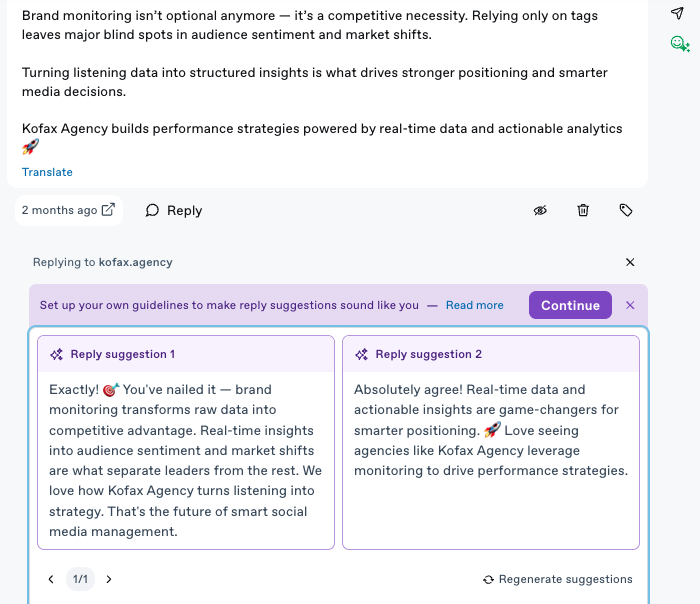
With the new AI Replies, two reply suggestions show up automatically the moment you click “Reply”, tuned to the channel, the conversation, and how your team usually sounds.
So you can reply faster and always stay on-brand.
How it works
Our update makes things noticeably smarter. The moment you open a ticket and click Reply, you’ll find two reply suggestions ready. Both context-aware, but built differently:
- Suggestion 1 is based on the AI Reply instructions, brand information, and channel policies you’ve set up in your settings.
- Suggestion 2 is based on your team’s actual replies on that channel over the last 180 days.
Pick the variant that fits better, send it with one click, or adjust it briefly first.
Good to know:
- The AI working in the background automatically factors in the character limits for different channels. So you won’t have to shorten any of the suggestions before sending them out.
- The AI understands the intent behind each comment. That’s why questions are answered in more depth by default than, say, opinion-style comments.
- The AI keeps learning in the background. It regularly looks at your comments and messages and continuously adapts how the suggestions sound and what they contain.
- You can also disable the automatic reply suggestions in the settings for each channel if you want. Once they’re turned off, the old “Help me reply” button will reappear in your tickets.
The setup: your AI Reply instructions
For AI Replies to truly sound like your brand, you should set your Reply instructions per channel. This is the lever with the biggest difference in the result. You’ll find the setting under Settings → Channels → select channel → AI Replies instructions.
You can also find an input field for “General Knowledge” in the channel settings under the AI default settings. There, you can enter general information about your company so the AI understands what kind of brand you are.

In those settings you can store all the important information about your brand, brand voice, and more, so the reply suggestions match your company as closely as possible.
Please note: This feature is available for users on M, L, and Custom plans.
Data protection & AI
Your data is always in safe hands at Swat.io. Our AI integration runs exclusively on AWS in Frankfurt. Customer data is never used to train AI models. Every workspace gets a fully isolated AI configuration. This way you can use AI without any data protection concerns.
Your Benefits
- Reply faster, with less effort. Instead of a blank text field, you already start with 2 reply suggestions. You’re simply quicker, and you put less of your own energy into each individual reply.
- On-brand without thinking about it. Reply instructions and continuous learning from existing conversations make AI Replies feel authentic, instead of sounding like a chatbot.
This could be interesting for you as well:
If you have any questions, don’t hesitate to contact our Support Team via Chat or support@swat.io.


