✨ Swat.io AI: New smart features for easier social media management Learn more now

Swat.io Publisher ✍

No more posting stress.

  • Plan. Publish. Breathe.
  • Team flow instead of approval friction.
  • AI that actually reduces your work.
Publisher Publisher Header EN 1
Discover Swat.io in <strong>just one Minute</strong>

You are currently viewing a placeholder content from Arcade. To access the actual content, click the button below. Please note that doing so will share data with third-party providers.

More Information

Good editorial planning needs the right structure

Deadlines, sign-offs, last-minute changes, and the feeling that something could slip at any moment. Social media never stops, and the mental load it creates just keeps running? You react more than you create, and by the end there is no capacity left for the good ideas?

With the Swat.io Publisher, you work with a clear head again instead of navigating constant chaos.

Made by Social Media Professionals, for Social Media Professionals

We've been focusing on the demands of professional social media teams since 2010. From single-person companies to international corporate groups, every organization needs to have clarity and control in order to free up more time for important social media management tasks. Over 18,000 users currently rely on our expertise.

Publisher ppc team 1
Publisher linkedin partner
Publisher pinterest partner

More time for communication that works

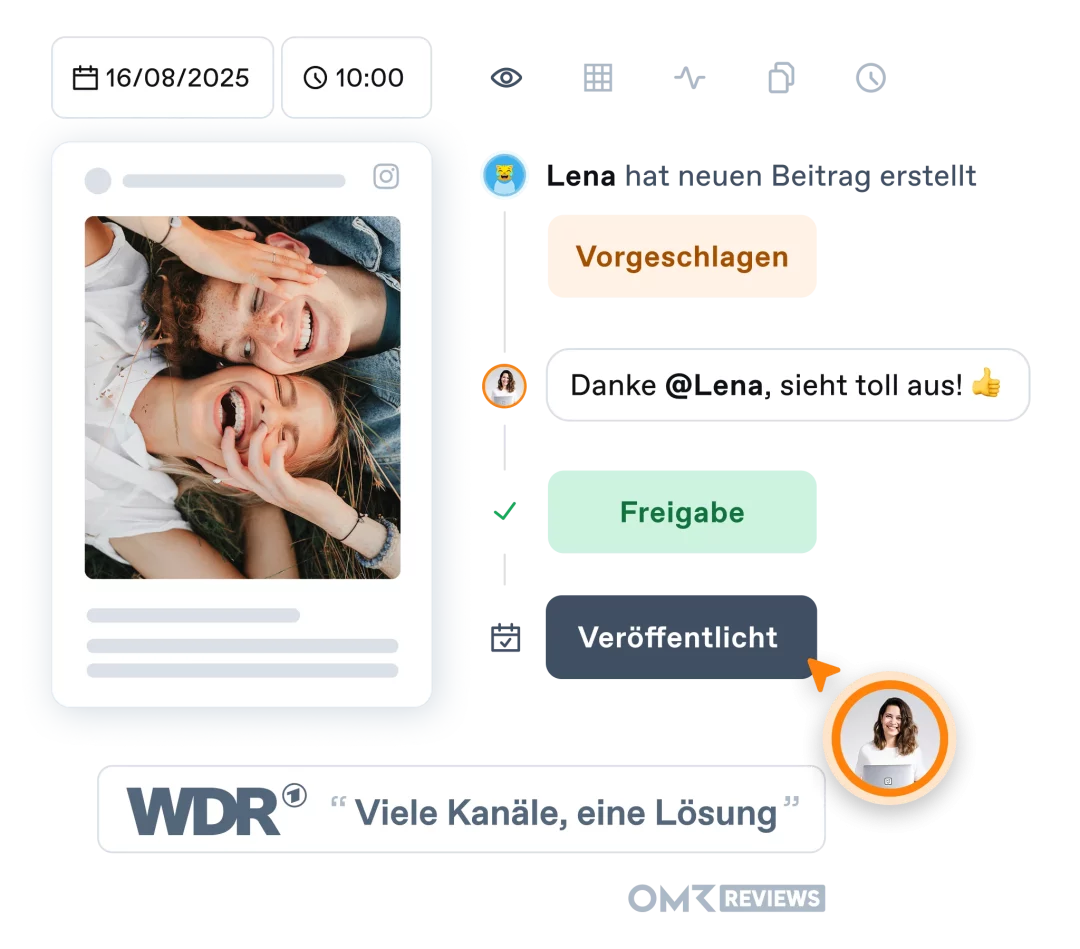
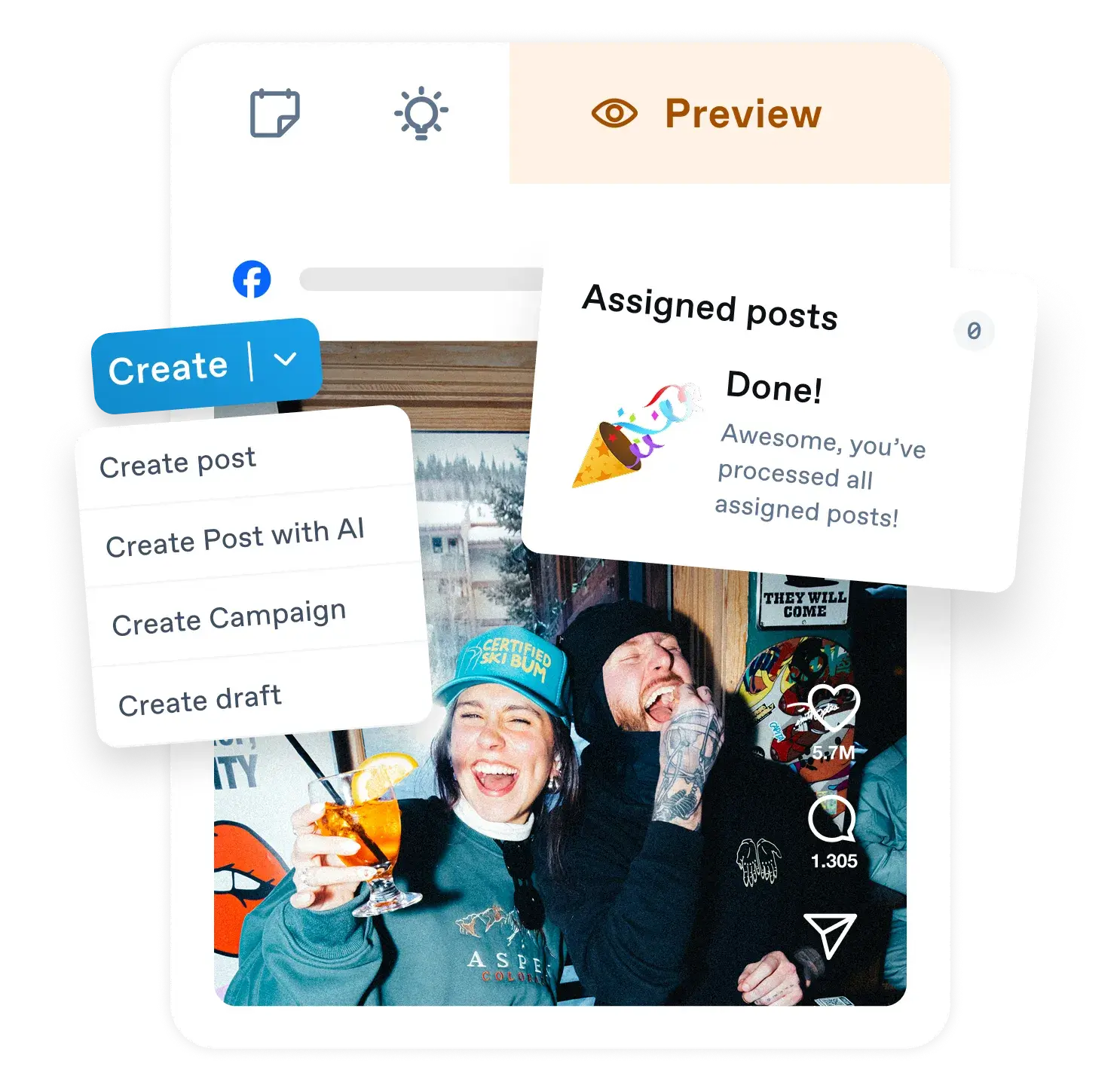
Plan your content together, in one place. Collect ideas as drafts, assign posts across your team, or send them for approval. Everyone knows what is coming up, who is on it, and what is next. This system cuts organizational overhead and frees up headspace for your work on the content itself.
  • Centralized content planning

    Plan your social media content together with your team. Use drafts to manage your ideas. Create posts, assign them within your team, or send them for approval to shape workflows around proven methods and keep them as efficient as possible.
  • Publish safely, whenever

    You can rely on your posts going out exactly when they should. Simplify your planning with our clear editorial calendar, set when posts go live, and Swat.io handles the rest, even when you have clocked off or you are on holiday.
Publisher Publisher Detail 1
  • AI to back you up

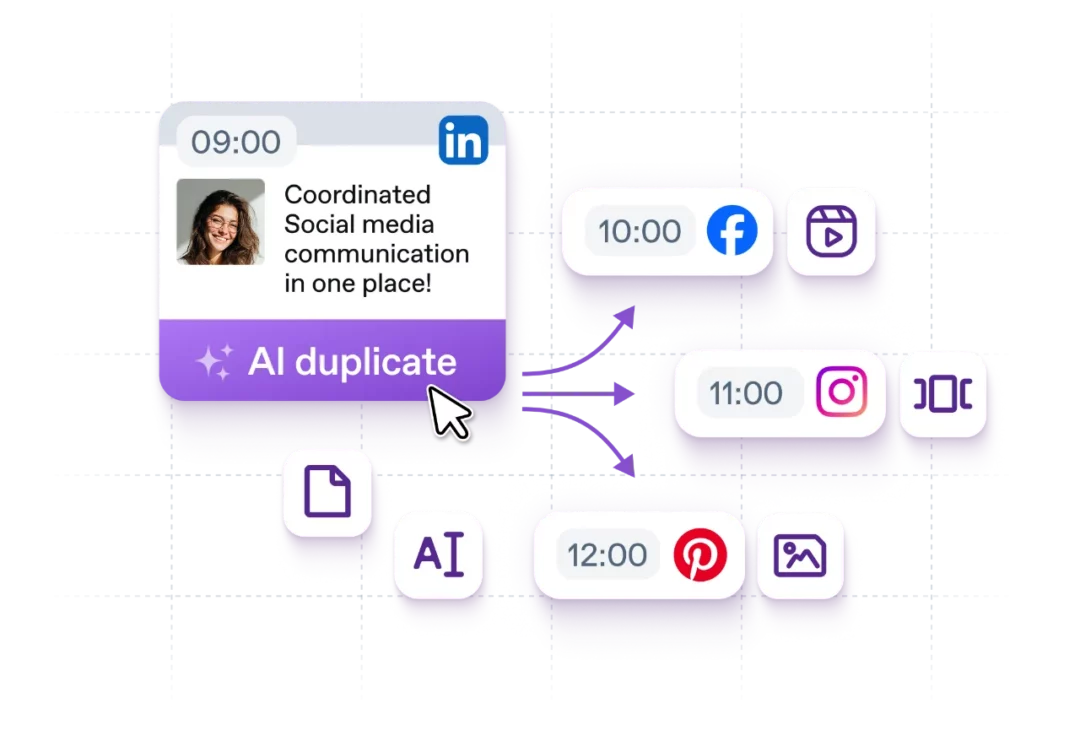
    Sometimes struggling to find the right words for a caption, or want to duplicate posts to other channels fast? Our AI is there when you need it. Generate text or adapt captions automatically so they fit other platforms, or get them translated into other languages.
  • Reach your audience with the right formats

    The choice is yours: text, link, image, album, video, or carousel. The Swat.io Publisher supports every content format so your posts look right in the feed. With newsfeed targeting options and reminders for advertising managers, you also make sure your content lands with the people you created it for.
Publisher global Publisher detail aicopy en
  • Everything at a glance, anytime

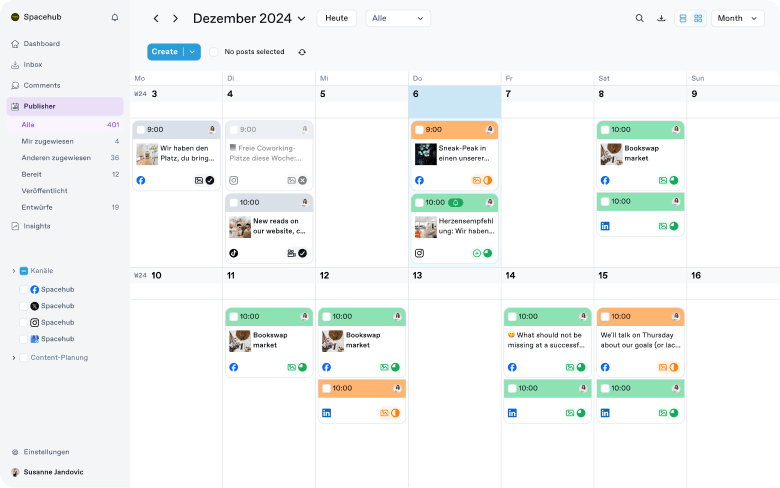
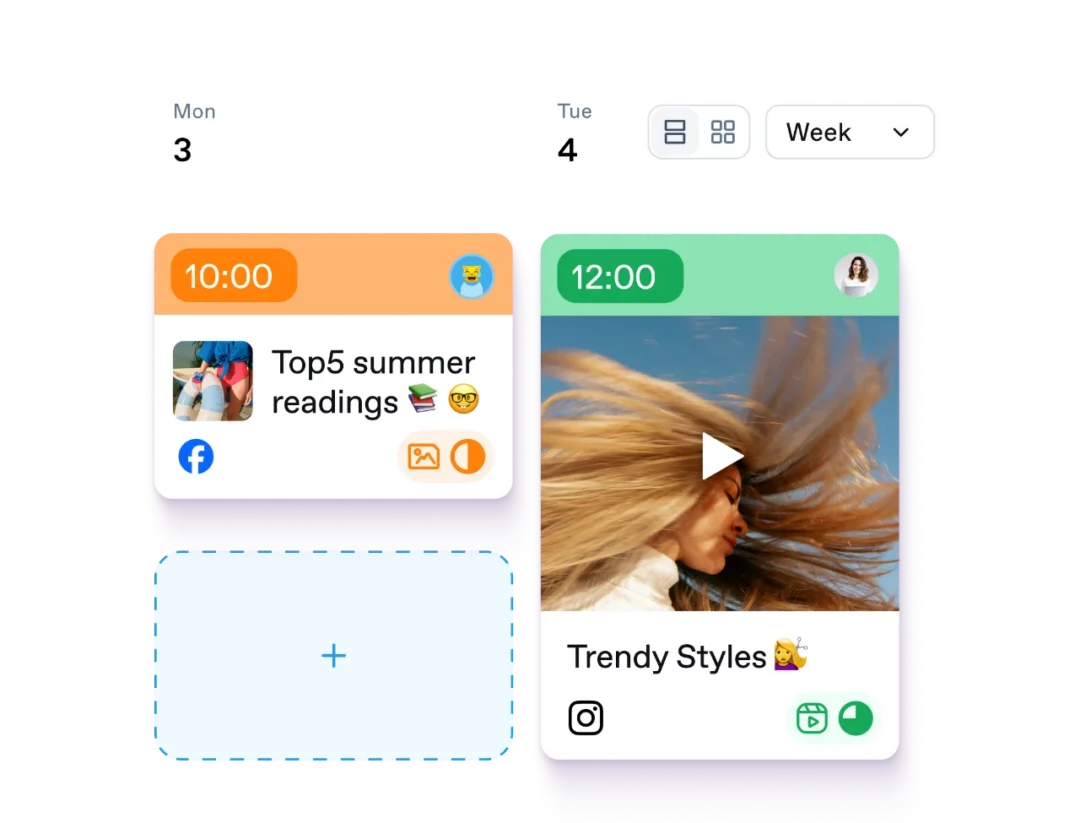
    Forget messy Excel sheets and clunky calendar views. The Publisher is built to give you full overview, with custom views that fit you and your teammates. We keep everything as clear as possible, so everyone finds their way quickly and long onboarding becomes unnecessary.
  • The workflows you actually need in social media

    We start where friction and frustration build up in your day, and built workflows that genuinely take the load off. From draft to finished post, cross-channel publishing, or coordination within the team and with externals: All this converges in Swat.io and works with few clicks.
Publisher loreal Publisher detail calendar en

Swat.io Publisher features you’ll love

Emoji

One login for all
your channels

No more shared logins and passwords passed around the team. Everyone gets access to the channels they need through their own Swat.io account.
Emoji

Post Composer for content optimization

Crop images and videos, rotate them, add filters, adjust colors, or add markups and text. You can also add captions and subtitles to your videos with ease.
Emoji

Duplicate and edit posts easily

Duplicate existing posts in a few clicks and tailor them for each channel. Think it once, publish it everywhere, without building everything from scratch.
Emoji

Filters and views

See all your team's planned, approved, and published content at a glance, in a custom day, week, month, or list view.
Emoji

Tags

Whether for campaigns, post formats, or content angles: tags let you categorize your posts, create order, and analyze those categories systematically.
Emoji

Create and optimize content with AI

Swat.io AI is your brainstorming buddy for writing great post copy. Or let the AI optimize your content and adapt it for extra channels.
Emoji

Experience a social media tool that actually takes the load off you

Find the plan that fits, start a no-commitment trial, and make social media easier across the board.
  • Try it free for 21 days
  • No payment information required
  • No automatic renewal

Small

Price incl. Add-Ons
For small teams with high demands.

Medium

Price incl. Add-Ons
For larger teams who want to work together quickly and effectively.

Large

Price incl. Add-Ons
For large teams with many channels and a full editorial schedule.

A social media tool tailored to your needs

Boost your team's productivity with Swat.io and take care of your social media management with ease. Coordinated feature sets that meet your needs.

✨ During the trial: All features & add-ons included, regardless of the chosen plan.
Publisher pricing publisher

Small

👋
For small teams with high demands: Get the feature set for outstanding social media management including our AI features.
Publisher pricing pu checkmark 1 Workspace
With Workspaces, you can manage different brands, locations, or agency clients separately. Each workspace can have its own connected channels and assigned user roles.
Publisher pricing pu checkmark 3 Channels
One channel means one social media account – for example, a Facebook Page, an Instagram profile or a LinkedIn account. If you want to connect two Facebook pages for instance, this would be two channels. This way you can mix and match according to your needs.
Publisher pricing pu checkmark 2 Users
“Users” refers to the number of Swat.io accounts included in your plan. So if 3 people need to work with Swat.io, you’ll need a plan that includes at least 3 users.
Publisher pricing

Inbox
The most important functions for successful community management.

Insights add-on only available for Medium and higher plans.
Included in the Small plan: 
  • Content calendar
  • Create, schedule and publish posts 
  • No posting limit
  • Post status: Suggested or approved
  • Activity log
  • AI features
  • Post preview
  • Analytics & Reports
  • 1 year data storage
  • Drafts
  • Assets Library
  • + Inbox Add-On
  • All interactions in one central Inbox
Most Popular Option
Publisher pricing publisher

Medium

✌
For larger teams who want to work together quickly and effectively: Benefit from proven workflows and efficient processes.
Publisher pricing pu checkmark 2 Workspaces
With Workspaces, you can manage different brands, locations, or agency clients separately. Each workspace can have its own connected channels and assigned user roles.
Publisher pricing pu checkmark 5 Channels
One channel means one social media account – for example, a Facebook Page, an Instagram profile or a LinkedIn account. If you want to connect two Facebook pages for instance, this would be two channels. This way you can mix and match according to your needs.
Publisher pricing pu checkmark 5 Users
“Users” refers to the number of Swat.io accounts included in your plan. So if 3 people need to work with Swat.io, you’ll need a plan that includes at least 3 users.
Publisher pricing

Inbox
Manage even larger communities in your team with ease.

Publisher pricing insights

Insights
Create individual dashboards and automate them for effortless reporting and analysis.

All functions from the Small plan plus:

  • Assign posts
  • Approval processes
  • Filters
  • Internal post notes
  • Integrated image and video editor
  • 2 years data storage
  • Campaigns
  • Tags
  • Canva integration
  • + Inbox Add-On
  • Tags
  • AI-supported reply suggestions
  • Automatic ticket prioritization & smart assign
  • + Advanced Insights Add-On
  • Custom dashboards
  • Automated reporting
Publisher pricing publisher

Large

💪
For large teams with many channels and a full editorial schedule: Get the complete feature set for effective social media management.
Publisher pricing pu checkmark 3 Workspaces
With Workspaces, you can manage different brands, locations, or agency clients separately. Each workspace can have its own connected channels and assigned user roles.
Publisher pricing pu checkmark 8 Channels
One channel means one social media account – for example, a Facebook Page, an Instagram profile or a LinkedIn account. If you want to connect two Facebook pages for instance, this would be two channels. This way you can mix and match according to your needs.
Publisher pricing pu checkmark 8 Users
“Users” refers to the number of Swat.io accounts included in your plan. So if 3 people need to work with Swat.io, you’ll need a plan that includes at least 3 users.
Publisher pricing

Inbox
For lively exchange in large communities with complex requirements and major goals.

Publisher pricing insights

Insights
Create individual dashboards and automate them for effortless reporting and analysis.

All functions from the Medium plan plus:

  • Extension of users, channels and workspaces possible
  • Extended permission levels
  • Extended campaigns
  • Planning channels
  • Unlimited data storage
  • + Inbox Add-On
  • Automated sentiment analysis & real-time shitstorm alert
  • Community hub with history, tags and notes
  • Performance insights for community management
  • + Advanced Insights Add-On
  • Custom dashboards
  • Automated reporting
Publisher pricing publisher

CustomAgency

🚀
🦄
Tailored solutions
for Social Media teams.

Are you a large team responsible for an extensive social media presence, including community management?
Then take advantage of a plan that is perfectly tailored to your needs.
Tailored social media solutions for agencies with dynamic project business. Say goodbye to rigid pricing models where you always pay the same amount. Here you can flexibly adjust the package scope to match your client projects.
From monthly
All functions from the Large plan plus:
  • Dedicated account manager
  • Individual account setup
  • Alignment of Swat.io contractual terms upon request
  • Activate all features upon request
  • Unlimited content planning channels
  • Payment by invoice
  • Access to beta lists
  • External approval
  • Inbox Add-On included
  • Premium Insights available
  • Monitoring available
All functions from the Large plan plus:
  • Flexible addition and removal of workspaces, users, and channels
  • Full Publisher & Inbox module included
  • Dedicated account management
  • Individual onboarding & training
  • Access to beta features
  • Alignment of Swat.io contractual terms upon request
  • External approval
  • Inbox Add-On included
  • Premium Insights available
  • Monitoring available
Publisher Kilian 1
Customer Support & Account Management
From day one, a dedicated account manager will be there for you, continuously supporting you with optimizations and strategic questions. In addition, you’ll have access to our support team’s priority service.
Publisher credit card
Publisher paypal
Publisher sepa
  • All prices excl. VAT.
  • Try it free for 21 days
  • No payment information required
  • No automatic renewal

Our Awards

Publisher badge OMR Reviews Top 100 2026
Publisher OMR Top Rated SM Suites Q3 26
Publisher OMR Badge Social Media Suites Q3 26
Publisher OMR Badge SM Listening Q3 26
Publisher OMR Badge SM Analytics Q3 26
Publisher OMR Badge CM Q3 26
Publisher ISO Badge EN

Full list of features

Channels
instagram facebook linkedin tiktok youtube pinterest bluesky threads
Content planning channel
Content planning channels allow you to keep track and add planned posts to your calendar, even for channels that aren't supported via Swat.io, such as newsletters.
no
no
yes
🔮 Features
Workspaces
With Workspaces, you have dedicated areas to manage your brands, locations, agency clients, or teams separately.
1
2
3
Schedule & publish posts
Create, duplicate, edit and delete posts.
yes
yes
yes
Assign posts
Assign posts to your team members.
no
yes
yes
Post status
yes
yes
yes
Activity log
Easily review and track post changes in the activity log.
yes
yes
yes
Post notes
Share post-related information with your team using notes in the activity log.
no
yes
yes
Post preview
Preview your posts for both mobile devices and desktops.
yes
yes
yes
Release process
Use the “Suggested” and “Approved” statuses and assign posts to other users.
no
yes
yes
Drafts
A designated section to collect your ideas for future posts and content.
yes
yes
yes
Advanced Drafts
Assign drafts a status and a due date, and keep an eye on everything thanks to the Kanban board.
no
yes
yes
Assets Library
A media library for all your social media assets (images, videos, documents) – plus the ability to easily add already published assets to the library.
yes
yes
yes
NEW
Tags
Assign tags to posts to help you filter and analyze them.
no
yes
yes
Filter
no
yes
yes
Search
yes
yes
yes
Campaigns
Adding campaigns to your calendar supports you to track and remember planned topics, upcoming events and campaigns.
no
yes
yes
Unique Swat.io Feature
Extended campaigns
Link posts to their respective campaigns.
no
no
yes
Unique Swat.io Feature
Imported posts
Posts published directly on social media platforms will automatically appear in your Swat.io calendar.
no
yes
yes
Image & Video editor
no
yes
yes
URL shortener
no
yes
yes
Reminder
Get automatic reminders for posts, e.g. if the publication time is not yet final or if you need to take care of additional tasks.
yes
yes
yes
First comment feature
Schedule the first comment to be published with your post.
no
yes
yes
Newsfeed targeting
no
yes
yes
Sponsored post
Easily create branded content for Facebook in Publisher.
no
yes
yes
Data storage
1 Year
2 Years
Unlimited
Basic permission levels
Assign different permission levels for your users: Full, Suggest posts and Read Only.
no
yes
yes
Expanded permission levels
For each connected channel, you can assign different permission levels to users: Full, Full permissions for assigned posts, Suggest posts, Feedback for assigned posts and Read Only.
no
no
yes
✨ AI Features
AI generate texts
Let AI create text suggestions for your posts.
yes
yes
yes
AI enhance texts
Let AI assist you in optimizing tonality, text length or simply translating your post texts.
yes
yes
yes
AI Hashtag & Emoji generation
yes
yes
yes
AI prompt templates
Easy creation of prompts thanks to templates.
yes
yes
yes
Individual AI settings
Set default parameters for each channel to accompany every AI prompt automatically, ensuring personalized results.
yes
yes
yes
AI duplicate
Duplicate posts for other channels and let AI automatically adapt the texts.
yes
yes
yes
Unique Swat.io Feature
AI Connect
MCP to connect Swat.io directly with your favourite LLM.
no
yes
yes
NEW
🤝 Integrations
Dropbox
yes
yes
yes
Google Drive
yes
yes
yes
Unsplash
Stock image library with free images for private and commercial use.
yes
yes
yes
Canva
no
yes
yes
NEW
🔐 Security
Servers located in Germany
yes
yes
yes
Highest data protection standards
yes
yes
yes
2-Factor authentication
yes
yes
yes
Priority Support
no
no
yes
🚨 Notifications
In-App
yes
yes
yes
Daily calendar
yes
yes
yes
E-Mail
yes
yes
yes
Out of office
yes
yes
yes
📊 Insights Explorer
The Explorer is available in all plans and provides predefined performance dashboards.
Audience
Analysis of fans, subscribers, and reach.
yes
yes
yes
Posts
Comprehensive analysis of post performance.
yes
yes
yes
Tags
Analysis of your content based on tags.
no
yes
yes
Publishing Performance
Number of created, assigned, and published posts per channel and time-to-approval.
no
no
yes
Reports
Export as Excel file.
yes
yes
yes
NEW
Data export
Export as Excel file.
yes
yes
yes
⛑️ Support
Standard Support
Support: Mon – Fri 8 am – 6 pm CE(S)T
yes
yes
yes
Priority Support
Priority support, 7 days/week (8 am – 8 pm CE(S)T)
no
no
yes
Helpcenter
yes
yes
yes
Chat
yes
yes
yes
Email
yes
yes
yes
Phone
no
no
yes
On-demand Video Tutorials
yes
yes
yes

Inbox Add-On

Publisher pricing
Inbox
The add-on for optimal community management. So that you can start conversations on social media and communication works in both directions


*When adding Inbox, its features will correspond with your chosen plan. All prices excl. VAT.

Small

The most important functions for successful community management.

Included in the Small plan:

  • All available channels
  • No ticket limit
  • Reply, like, hide, delete, block
  • 1 year data storage
extra per month

Medium

Manage even larger communities in your team with ease.

All functions from the Small plan plus:

  • AI Replies & Automations
  • 2 years data storage
  • Tags
  • Filters
  • URL shortener
extra per month

Large

For lively exchange in large communities with complex requirements and major goals.
All functions from the Small and Medium plans plus:
  • Unlimited data storage
  • Mini CRM
  • Analytics
  • Priority support
  • Shitstorm alert
  • Comment list
extra per month

Full list of features

Channels
instagram facebook linkedin youtube tiktok google_mybusiness whatsapp messenger bluesky threads
🔮 Features
Edit tickets
Reply to, like, hide or delete comments and messages (individual actions may vary for different networks).
yes
yes
yes
Manage tickets
Archive, star or ignore tickets.
yes
yes
yes
Assign tickets
no
yes
yes
Activity log
Easily review and track all ticket activities within the activity log.
yes
yes
yes
Ticket notes
Share ticket-related information with your team using notes in the activity log. You can also tag team members or link comments within your notes for collaboration and context.
no
yes
yes
Block users
yes
yes
yes
Tags
Assign individual tags to tickets to help you filter and analyze them.
no
yes
yes
Filter
no
yes
yes
Search
yes
yes
yes
URL shortener
no
yes
yes
Reply templates
Create templates for inquiries that need to be answered regularly and save valuable time.
no
no
yes
Mini CRM
Manage your users in the Mini CRM, where you can access key user information, add comments for reference, link associated social media profiles, and assign tags for efficient user management.
no
no
yes
Sentiment
Set the moods of messages and comments to keep track of how your community is feeling at the moment.
no
no
yes
Automations
Create keyword-based automations to perform actions such as assigning messages, adding tags, or marking as read, simplifying the management of repetitive tasks.
no
yes
yes
Forward tickets via email
Forward tickets by email to people without a Swat.io account. Responses to the email will be displayed in the activity log.
no
yes
yes
Auto reply
Set up automated responses for private messages, informing users about expected response times or business hours.
no
no
yes
Permanently assign tickets
no
yes
yes
Comment list
For an efficient workflow when large volumes of comments need to be processed in a short space of time.
no
no
yes
BETA
Shitstorm Alert
Set an alert if a certain limit of unread comments is exceeded.
no
no
yes
Data storage
1 Year
2 Years
Unlimited
Full permission levels
Full, Full for assigned tickets, Feedback for assigned tickets and Read Only.
no
yes
yes
Ticket export
no
yes
yes
✨ AI Features
AI Replies
Get two reply suggestions from AI automatically, based in your tone of voice, company information and more.
no
yes
yes
AI Enhance
Adapt your own or AI generated replies further.
no
yes
yes
AI "Mark as read" & "Hide"
Ai automatically marks messages that don't need replies as read and hides inappropriate comments.
no
yes
yes
AI Sentiments
Allow AI to automatically analyze and assign sentiments (positive, negative, or neutral) to incoming comments.
no
no
yes
Unique Swat.io Feature
🔐 Security
Servers located in Germany
yes
yes
yes
Highest data protection standards
yes
yes
yes
2-Factor authentication
yes
yes
yes
Priority Support
no
no
yes
🚨 Notifications
In-App
yes
yes
yes
Daily calendar
yes
yes
yes
Email notifications
yes
yes
yes
Out of office
yes
yes
yes
📊 Analytics
Comments
Total number of comments, broken down into hidden, deleted, and replied-to comments, plus sentiment analysis of comments and mentions.
no
no
yes
Direct Messages
Total number of direct messages and their sentiment.
no
no
yes
Community Sentiment
Analysis of community sentiment based on sentiments per comment.
no
no
yes
Community Hub
Mini CRM: An overview of all community members who have interacted with you. Within these member profiles, you can add additional information, tag them, and link related profiles.
no
no
yes
Tickets
Number of received, answered, assigned, and open tickets, and calculation of response and turnaround time.
no
no
yes
Data Export
Export as Excel file.
no
no
yes
Reports
Export as Excel file.
no
no
yes
⛑️ Support
Standard Support
Support: Mon – Fri 8 am – 6 pm CE(S)T
yes
yes
yes
Priority Support
Priority support, 7 days/week (8 am – 8 pm CE(S)T)
no
no
yes
Helpcenter
yes
yes
yes
Chat
yes
yes
yes
Email
yes
yes
yes
Phone
no
no
yes
On-demand Video Tutorials
yes
yes
yes

Available Add-Ons

Publisher pricing insights
Insights Advanced

For teams on the M or L plan who need custom KPI dashboards and efficient reporting without having to switch to our largest plan.

  • Up to 5 custom dashboards per workspace
  • Up to 12 widgets per dashboard
  • Up to 5 automated reports
  • Custom data visualization
  • Flexible day/week/month aggregation
extra per month
Publisher insights premium addon
Premium Insights

For teams on the Custom or Agency plan with complex setups, multiple brands, or client accounts who need detailed reports for every level of their organization.

  • Unlimited custom dashboards
  • Up to 24 widgets per dashboard
  • Unlimited automated reports
  • Custom data visualization
  • Flexible day/week/month aggregation
upon request
for Custom & Agency plans
Publisher eye open
Monitoring
Monitor what users are saying online about your brand, products, competitors, or other industry-specific topics on the internet.
upon request
extra per month

Integrations

Publisher
Publisher google drive
Publisher canva
Publisher unsplash

Are you a small non-profit?
We offer special discounts for eligible organisations!
Reach out to see if you qualify.

Publisher zotterLOGO
Florian Figl, Content Manager

With Swat.io, we’ve regained clarity in our social media management

He and his team use social media successfully to build and enhance the company’s relationships with its customers. Find out how the team works with Swat.io!
Zotter Herstellung
4.5 out of 5

Our customers are trusting Swat.io and here's what they're saying about us.

Frequently Asked Questions

What is Swat.io Publisher and who is it for?

Swat.io Publisher is the content planning and publishing tool for social media teams. You plan, create, and publish posts for all connected channels in one central editorial calendar. It's particularly suited for marketing teams and agencies managing multiple channels simultaneously and running structured approval processes.

Which channels does Swat.io Publisher support?

Publisher supports Instagram, Facebook, LinkedIn, TikTok, YouTube, Pinterest, Bluesky, and Threads. You manage all channels in a single calendar without switching between native apps.

What's the difference between Publisher and Inbox?

Publisher handles content planning and publishing: editorial calendar, approval workflows, scheduling. Inbox is the separate add-on for community management: responding to, assigning, and archiving incoming messages, comments, and mentions. Insights is an additional add-on for in-depth analytics and reporting. All three tools together cover the entire social media workflow.

How does the approval process work in Swat.io Publisher?

Posts are marked as "suggested" or "approved". Team members submit drafts, responsible people receive a notification, and can comment, approve, or send back for revision directly in the tool. The entire coordination process runs in Swat.io, without email chains.

What AI features does Swat.io Publisher offer?

You can generate and optimize text with AI, get automatic hashtag and emoji suggestions, create custom AI prompt templates, and adapt posts for different channels with one click. With AI Connect, Swat.io also integrates via MCP.

How do the Publisher plans Small, Medium, and Large differ?

Small covers the core features for straightforward content management. Medium adds collaborative team workflows for larger teams. Large is for teams with many channels and complex editorial plans, with unlimited data storage and advanced campaign features. Agencies have a dedicated agency plan available.

Social media management that serves you and your community.

  • Less stress and more time for creative work
  • All channels in one place instead of 100 open tabs
  • Smart workflows for smooth team collaboration
Publisher Publisher Integrations Box unten EN